






















































« Quelqu’un a-t-il déjà essayé de découper du contreplaqué au laser ? »
Dans ce guide, nous examinerons de plus près la découpe laser du contreplaqué, des notions de base aux applications pratiques. Que vous débutiez dans la découpe laser ou que vous exploriez des projets créatifs, ce guide vous aidera à comprendre clairement le processus.
Nous inclurons également un exemple pratique : la fabrication d’une enseigne de porte en contreplaqué découpée au laser, afin que vous puissiez appliquer ce que vous avez appris étape par étape. Commençons ensemble ce voyage créatif !

Dans cet article :
- Partie 1 : Présentation de la découpe laser du contreplaqué
- 1.1 Qu’est-ce que la découpe laser du contreplaqué ?
- 1.2 Comment fonctionne la découpe laser du contreplaqué ?
- 1.3 Qu’est-ce qu’une machine de découpe laser pour contreplaqué ?
- Étude de cas : Fabriquez une enseigne de porte en contreplaqué découpée au laser en 5 étapes💡
- FAQ : Questions fréquentes sur la découpe laser du contreplaqué
Partie 1 : Présentation de la découpe laser du contreplaqué
1.1 Qu’est-ce que la découpe laser du contreplaqué ?
La découpe laser du contreplaqué, parfois appelée découpe du contreplaqué au laser, est une méthode moderne et précise utilisée pour découper et façonner le contreplaqué en motifs, textes et composants personnalisés. Elle est couramment utilisée dans le bricolage, les loisirs créatifs et la production à petite échelle.
1.2 Comment fonctionne la découpe laser du contreplaqué ?
« Peut-on découper du contreplaqué au laser ? »Oui, c’est possible.
Ce processus utilise un faisceau laser concentré dirigé vers la surface du contreplaqué. La chaleur produite par le laser brûle ou vaporise le matériau le long d’un parcours programmé, ce qui permet d’obtenir des découpes nettes et précises.
Comme le processus est contrôlé par logiciel, même les motifs complexes et détaillés peuvent être reproduits avec une grande précision. Par rapport aux méthodes conventionnelles de découpe du contreplaqué, la découpe laser offre :

- Bords nets nécessitant un minimum de finition
- Excellente précision pour les motifs complexes
- Réduction du gaspillage de matériau grâce à une largeur de trait de coupe réduite
Cela la rend idéale pour les applications créatives et fonctionnelles.
1.3 Qu’est-ce qu’une machine de découpe laser pour contreplaqué ?
Pour obtenir des résultats nets et homogènes lors de la découpe du contreplaqué, il est généralement recommandé d’utiliser une machine de découpe laser pour contreplaqué dédiée. Ces machines améliorent la précision de découpe et l’efficacité du flux de travail, ce qui les rend adaptées aux panneaux de signalétique, aux maquettes architecturales, aux éléments décoratifs et aux projets de fabrication en atelier partagé dans toute l’UE.
Several types of laser cutters are available today, including diode, CO₂, and fibre laser systems. Many beginners ask: What is the best laser for cutting plywood? or Which laser cutter is suitable for indoor workshop use?
Pour les amateurs et les utilisateurs de petits ateliers dans toute l’UE, les machines compactes à diode telles que LP5, LP4 et LX2 constituent souvent les solutions les plus pratiques.
Ces machines de découpe laser du contreplaqué à diode sont :
- Facile à utiliser pour les débutants
- Plus abordable que les systèmes de découpe industriels au CO₂
- Adapté aux applications de découpe légère à moyenne du contreplaqué
- Suffisamment compact pour les ateliers et les espaces de type fab lab
Parmi ces options, le LX2 convient particulièrement aux utilisateurs qui ont besoin d’une puissance de découpe supérieure et d’une zone de travail plus grande. Grâce à sa zone de travail de 500 mm × 305 mm, il permet de découper de grandes plaques de contreplaqué sans repositionnements fréquents, ce qui améliore l’efficacité du flux de travail lors de la production de panneaux signalétiques, de composants pour loisirs créatifs ou de structures miniatures.
Avec des modules à diode plus puissants installés, le LX2 offre de meilleures performances de découpe du bois en un seul passage :
- Module à diode de 60 W → jusqu’à 25 mm de bois (en un seul passage)
- Module à diode de 40 W → jusqu’à 22 mm de bois (en un seul passage)
- Module à diode de 20 W → jusqu’à 12 mm de bois (en un seul passage)
De plus, la certification de sécurité laser de classe 1 du LX2 le rend particulièrement adapté aux ateliers intérieurs, aux espaces de fabrication éducatifs et aux installations partagées de type fab lab dans toute l’UE, où le respect des normes de sécurité est souvent un facteur important.

💡 Étude de cas : Fabriquer une pancarte de porte suspendue en contreplaqué découpée au laser en 5 étapes
Liste de préparation pour la découpe laser du contreplaqué :
- Matériau : Plaque de contreplaqué de 3 mm
- Machine : Découpeuse laser à diode
- Design : Formes, textes ou motifs personnalisés
La découpe laser d’une plaque de contreplaqué destinée à fabriquer une pancarte de porte suspendue est un processus simple. En général, ce type de projet peut être réalisé en environ 30 minutes en suivant un flux de travail bien défini.
Étape 1 : Choisir votre matériau — Contreplaqué
Choisir le bon contreplaqué est essentiel pour obtenir des résultats réguliers et précis. Chaque type de matériau nécessite des paramètres laser spécifiques.
Assurez-vous que le contreplaqué utilisé est adapté à la découpe laser afin d’éviter les risques pour la sécurité.

Étape 2 : Sélectionner la machine de découpe laser appropriée
Pour ce projet, le LaserPecker 4 (LP4) est une option fiable, particulièrement adaptée à la découpe précise du contreplaqué et aux travaux détaillés.
D’autres options incluent :
- La LP5 est une alternative performante, offrant des résultats fiables pour la découpe du bois (jusqu’à environ 20 mm) et le gaufrage du bois, ce qui la rend adaptée à un large éventail d’applications
- La LaserPecker LX2 propose des configurations plus puissantes (20 W / 40 W / 60 W), ce qui la rend particulièrement adaptée aux projets de plus grande envergure et aux matériaux en bois plus épais. Ses performances de découpe comprennent :
- Diode de 60 W : jusqu’à 25 mm de bois (en un seul passage)
- Diode de 40 W : jusqu’à 22 mm de bois (en un seul passage)
- Diode de 20 W : jusqu’à 12 mm de bois (en un seul passage)
Dans l’UE, les utilisateurs qui travaillent avec du contreplaqué plus épais ou réalisent une production à petite échelle privilégient souvent des solutions plus puissantes comme la LX2, pour une meilleure efficacité et des résultats uniformes.
Utilisez une application ou un logiciel de conception graphique tel que LaserPecker Design Space ou des outils comme Photoshop pour créer ou importer votre motif.
tenez compte des éléments suivants :
- Dimensions et mise à l’échelle
- Forme et positionnement
- Complexité du motif
Vous pouvez également consulter LaserPecker CraftZone pour trouver des idées ou acheter en ligne des fichiers de motifs pour découpe laser sur bois afin d’utiliser des modèles prêts à l’emploi.
Étape 4 : configurer la découpe laser
Pour préparer votre machine :
- Allumez l’appareil et connectez-le (Wi-Fi, USB ou Bluetooth)
- Importez votre motif (formats JPG, PNG, SVG et G-code pris en charge)
- Positionnez le motif et activez le mode aperçu
- Ajustez la mise au point et l’alignement
- Définissez des paramètres tels que la vitesse, la puissance et la résolution
Réglages recommandés pour le contreplaqué avec la LaserPecker 4 (LP4) :
- Laser à diode de 10 W, 450 nm
- Résolution : 2K
- Puissance : 100 %
- Profondeur : 90 %
- Passes : 1
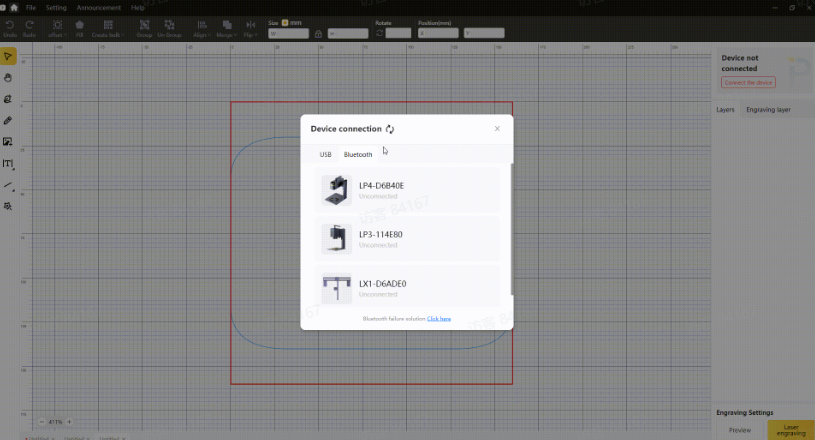
Étape 5 : commencer la découpe laser
Après avoir vérifié tous les réglages, lancez la découpe et surveillez la progression afin d’obtenir des résultats optimaux.
Recommandations de sécurité :
- Portez des lunettes de protection ou utilisez un capot de protection
- Utilisez un purificateur d’air pour gérer les fumées et les particules
- Assurez une ventilation adéquate pendant l’utilisation
FAQ : questions fréquentes sur la découpe laser du contreplaqué
Q1. Peut-on découper du contreplaqué au laser chez soi ?
Oui, il est possible de découper du contreplaqué au laser chez soi à l’aide d’une machine de découpe laser pour contreplaqué compacte à diode, comme la LaserPecker4 (LP4), LP5 ou la LX2. Ces machines sont conçues pour être faciles à utiliser, même pour les débutants, et conviennent aux ateliers intérieurs dans toute l’UE.
Pour les utilisateurs travaillant avec des matériaux en contreplaqué plus épais ou des panneaux de projet plus grands, le LX2 offre une flexibilité supplémentaire grâce à sa zone de travail de 500 × 305 mm et à sa capacité de coupe renforcée en un seul passage lorsqu’il est équipé de modules à diode plus puissants. Il est donc particulièrement utile pour la fabrication d’éléments de signalétique, de panneaux décoratifs et de maquettes architecturales à domicile.
De plus, la certification de sécurité laser de classe 1 du LX2 le rend particulièrement adapté aux studios créatifs intérieurs et aux espaces de création partagés (« maker spaces ») dans toute l’UE, où la conformité aux normes de sécurité est souvent requise.
Q2. Quel contreplaqué convient à la découpe laser ?
Le contreplaqué composé de couches uniformes et contenant peu de colle, comme le contreplaqué de bouleau, est généralement recommandé pour obtenir une meilleure qualité de coupe et des bords plus nets.
Q3. Quelle épaisseur de contreplaqué une machine de découpe laser peut-elle découper ?
L’épaisseur maximale de contreplaqué qu’une machine de découpe laser peut traiter dépend principalement de la puissance du laser et de la configuration de la machine. Par exemple, le LP5 peut découper jusqu’à 20 mm de tilleul dans des conditions optimales, tandis que la plupart des machines compactes de découpe laser à diode conviennent généralement mieux aux feuilles de contreplaqué plus fines, d’environ 3 à 6 mm de contreplaqué, pour une utilisation régulière en atelier intérieur.
Pour les utilisateurs nécessitant une capacité de coupe plus importante, le LX2 offre de meilleures performances en un seul passage lorsqu’il est équipé de modules à diode plus puissants :
- Module de 60 W → jusqu’à 25 mm de bois (en un seul passage)
- Module de 40 W → jusqu’à 22 mm de bois (en un seul passage)
- Module de 20 W → jusqu’à 12 mm de bois (en un seul passage)
Associé à sa certification de sécurité de classe 1, le LX2 est particulièrement adapté aux studios de fabrication en intérieur, aux ateliers éducatifs et aux espaces de création partagés (« maker spaces ») dans toute l’UE, où la profondeur de coupe et la sécurité d’utilisation sont des considérations importantes.
Q4. La découpe laser du contreplaqué présente-t-elle des risques pour la sécurité ?
Oui, la sécurité est importante. Portez toujours des lunettes de protection ou utilisez des protections adaptées, assurez une bonne circulation de l’air et utilisez un purificateur d’air pour gérer la fumée et les émanations potentiellement nocives.
Q5. Comment éviter les marques de brûlure lors de la découpe du contreplaqué ?
Pour réduire les marques de brûlure au minimum, optimisez les réglages de votre laser (puissance, vitesse), utilisez un matériau de qualité et veillez à ce que le laser soit correctement mis au point.
Q6. Quel logiciel est nécessaire pour les projets de découpe laser ?
Un logiciel ou une application de conception graphique est nécessaire pour préparer vos fichiers. Vous pouvez utiliser LaserPecker Design Space ou d’autres outils de conception courants, selon votre flux de travail.
Conclusion
En conclusion, la découpe laser du contreplaqué offre une méthode fiable et précise pour transformer le contreplaqué en produits à la fois décoratifs et fonctionnels, avec des finitions nettes et des détails complexes.
Il est largement utilisé dans les applications créatives, commerciales et personnelles, offrant une grande flexibilité pour tout, des designs personnalisés à la fabrication à petite échelle.





