






















































Les cartes de visite restent l’un des moyens les plus efficaces de faire une forte première impression. Cependant, dans un environnement professionnel concurrentiel, les cartes en papier standard peinent souvent à se démarquer. La gravure laser offre une solution moderne. Grâce à une technologie laser précise, vous pouvez transformer des cartes de visite ordinaires en créations distinctives, notamment des cartes métalliques durables, des modèles en bois durables et des styles contemporains en acrylique.
Ce guide explique tout ce que les débutants doivent savoir sur la gravure laser de cartes de visite, du concept de base et des principes de fonctionnement au choix de machines adaptées, en passant par la compréhension des exigences de sécurité et le suivi d’un processus étape par étape pour créer des cartes professionnelles et personnalisées qui font vraiment la différence.

Dans cet article :
- Partie 1 : Présentation de la gravure laser de cartes de visite
- 1.1 Qu’est-ce que la gravure laser de cartes de visite
- 1.2 Comment fonctionne la gravure laser sur les cartes de visite
- 1.3 Quelle machine de gravure est la plus adaptée à la gravure de cartes de visite
- 1.4 Précautions de sécurité avant de graver des cartes de visite
- Partie 2 : Pourquoi utiliser la gravure laser pour les cartes de visite
- Étude de cas : Comment graver des cartes de visite au laser en 5 étapes 💡
- FAQ : Questions fréquentes sur la gravure laser de cartes de visite
Partie 1 : Présentation de la gravure laser de cartes de visite
1.1 Qu’est-ce que la gravure laser de cartes de visite ?
La gravure laser de cartes de visite désigne le processus consistant à utiliser un faisceau laser focalisé pour graver du texte, des logos ou des motifs complexes sur des matériaux tels que le bois, le métal, le plastique ou du papier haut de gamme.
Contrairement à l’impression conventionnelle, cette méthode retire la couche supérieure du matériau afin de créer une finition permanente, précise et texturée. Ainsi, les cartes gravées offrent une apparence plus distinctive et professionnelle, de plus en plus appréciée par les entreprises et les créateurs à travers l’UE.

1.2 Comment fonctionne la gravure laser sur les cartes de visite ?
La gravure laser fonctionne en dirigeant un faisceau laser haute puissance sur la surface de la carte de visite. L’énergie du laser vaporise ou brûle une fine couche du matériau, produisant des lignes nettes et détaillées.
L’effet final dépend du matériau utilisé :
- Cartes en bois ou en bambou : créent des gravures foncées et très contrastées au rendu naturel
- Cartes métalliques (acier inoxydable, aluminium, titane) : produisent des marquages nets ou des variations de couleur selon la technologie laser
- Cartes en plastique ou en acrylique : permettent d’obtenir des finitions givrées ou semi-transparentes
Cette flexibilité rend la gravure laser adaptée à un large éventail d’applications professionnelles et de préférences en matière de design sur les différents marchés de l’UE.

1.3 Quelle machine de gravure est la plus adaptée à la gravure de cartes de visite ?
Les graveurs laser à diode sont largement utilisés pour la gravure de cartes de visite grâce à leur compatibilité avec différents matériaux, notamment le bois, l’acrylique, le cuir, le papier couché et certains métaux.
Dans l’UE, les amateurs et les petites entreprises préfèrent souvent des graveurs laser à diode compacts et polyvalents, tels que LP5, LP4 Ces machines sont appréciées pour leur facilité d’utilisation, leur prix abordable et leur adaptabilité aux différents besoins des projets.
Ils conviennent particulièrement aux débutants qui souhaitent produire efficacement des cartes de visite personnalisées tout en maintenant une qualité constante.

1.4 Consignes de sécurité avant de graver des cartes de visite
La gravure laser est sûre lorsque les précautions appropriées sont prises. Avant de commencer, il est important de suivre les consignes de sécurité suivantes :
- Prévoir une ventilation adéquate : en particulier lors du travail avec des matériaux enduits ou plastiques susceptibles d’émettre des fumées
- Maintenir les matériaux fermement en place : pour garantir la précision et éviter les erreurs
- Tester les paramètres de gravure : sur des matériaux de rechange avant la production finale
Partie 2 : pourquoi utiliser la gravure laser pour les cartes de visite ?
La gravure laser est devenue une option privilégiée pour les professionnels et les entreprises de l’UE souhaitant créer des cartes de visite distinctives et de haute qualité. Comparée aux techniques d’impression conventionnelles, elle offre une approche plus durable, précise et personnalisable.
Les principaux avantages sont les suivants :
① Une apparence unique et professionnelle
Les cartes gravées au laser offrent une surface raffinée et tactile qui rehausse leur attrait visuel. La finition gravée ajoute de la profondeur et de la texture, contribuant à créer une impression forte et durable.
Des logos minimalistes aux motifs artistiques détaillés, le résultat offre un aspect haut de gamme qui s’accorde parfaitement avec les tendances actuelles de l’image de marque sur les marchés de l’UE.
② Haute précision et personnalisation
La gravure laser permet de réaliser des motifs très détaillés, allant du texte fin à des éléments graphiques complexes. Elle permet également une personnalisation fonctionnelle, notamment :
- Noms individuels ou coordonnées de l’entreprise
- Codes QR renvoyant vers des sites web ou des portfolios
- Numérotation séquentielle à des fins d’identification ou de suivi
Cette flexibilité rend la gravure laser adaptée à un large éventail d’applications professionnelles au sein de l’UE.
③ Durabilité et longévité
Contrairement aux motifs imprimés, qui peuvent se décolorer ou s’user avec le temps, les gravures laser sont permanentes.
Appliqué à des matériaux tels que le métal, le bois ou l’acrylique, le motif devient très résistant aux rayures et à la décoloration. Les cartes de visite conservent ainsi leur aspect professionnel, même après une utilisation prolongée — un point important pour les entreprises opérant dans différents environnements de l’UE.
Étude de cas : comment graver des cartes de visite au laser en 5 étapes 💡
Avant de commencer, assurez-vous d’avoir préparé les éléments suivants :
Liste de contrôle pour préparer la gravure laser de cartes de visite :
- Matériau de gravure : cartes de visite
- Machine de gravure : graveur laser à diode
- Motif de gravure : nom, logo, images, motifs, etc.
Est-il possible de graver des cartes de visite ? Oui, et le processus est relativement simple. Dans la plupart des ateliers ou petites entreprises de l’UE, la gravure peut être réalisée en quelques minutes une fois que tout est correctement configuré.
Étape 1 : Préparer votre motif
Commencez par préparer votre illustration, votre logo ou votre texte. Les formats vectoriels tels que SVG ou AI offrent la meilleure précision, bien que la plupart des logiciels de gravure prennent en charge les formats d’image et de texte courants.
Pour des résultats optimaux, utilisez des motifs à contraste élevé et des lignes fines et nettes, en particulier pour graver des cartes en aluminium anodisé.
Étape 2 : Choisir la bonne machine de gravure laser pour graver des cartes de visite
Choisir une machine adaptée est essentiel pour obtenir des résultats fiables et reproductibles.
Dans l’UE, de nombreux utilisateurs privilégient des solutions polyvalentes et compactes telles que le LaserPecker 4 (LP4), qui offre :
- Laser à diode de 10 W à 450 nm
- Laser infrarouge de 2 W à 1064 nm
- Vitesses allant jusqu’à 4 000 mm/s
Cela la rend adaptée à une large gamme de matériaux et d’applications pour cartes de visite.
Étape 3 : Fixer la carte de visite
Placez les cartes de visite à plat sur la surface de gravure et fixez-les à l’aide de ruban adhésif, de poids ou de pinces si nécessaire.
Une installation stable garantit une profondeur de gravure constante et évite les problèmes d’alignement, ce qui est particulièrement important pour la production en série.
Étape 4 : Configurer la machine de gravure laser pour cartes de visite
Utilisez l’application ou le logiciel de conception graphique LaserPecker ou des outils tiers tels que Photoshop pour créer ou importer votre motif. Ajustez les dimensions et le positionnement en fonction du format de la carte.
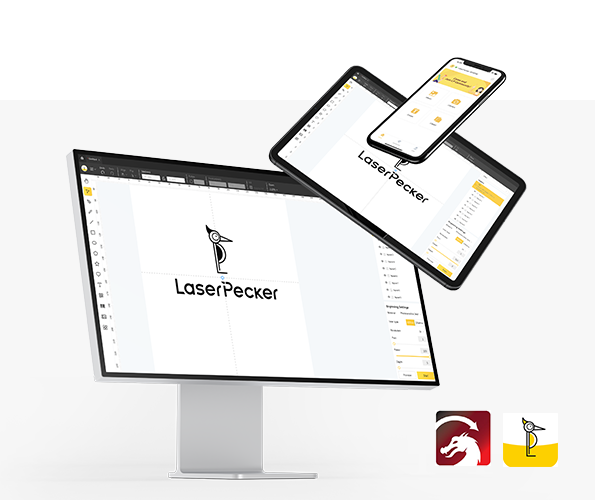
Vous pouvez également utiliser LaserPecker CraftZone pour trouver de l’inspiration ou des fichiers de conception prêts à l’emploi.
Passez ensuite à la configuration :
- Allumez la machine de gravure et connectez-la via Wi-Fi, USB ou Bluetooth
- Importez votre motif (JPG, PNG, G-code, SVG, etc.)
- Positionnez le motif dans la zone de travail et activez le mode Aperçu
- Assurez-vous de l’alignement et de la mise au point
- Ajustez la mise en page pour l’adapter aux dimensions de la carte

Configurez ensuite les paramètres de gravure.
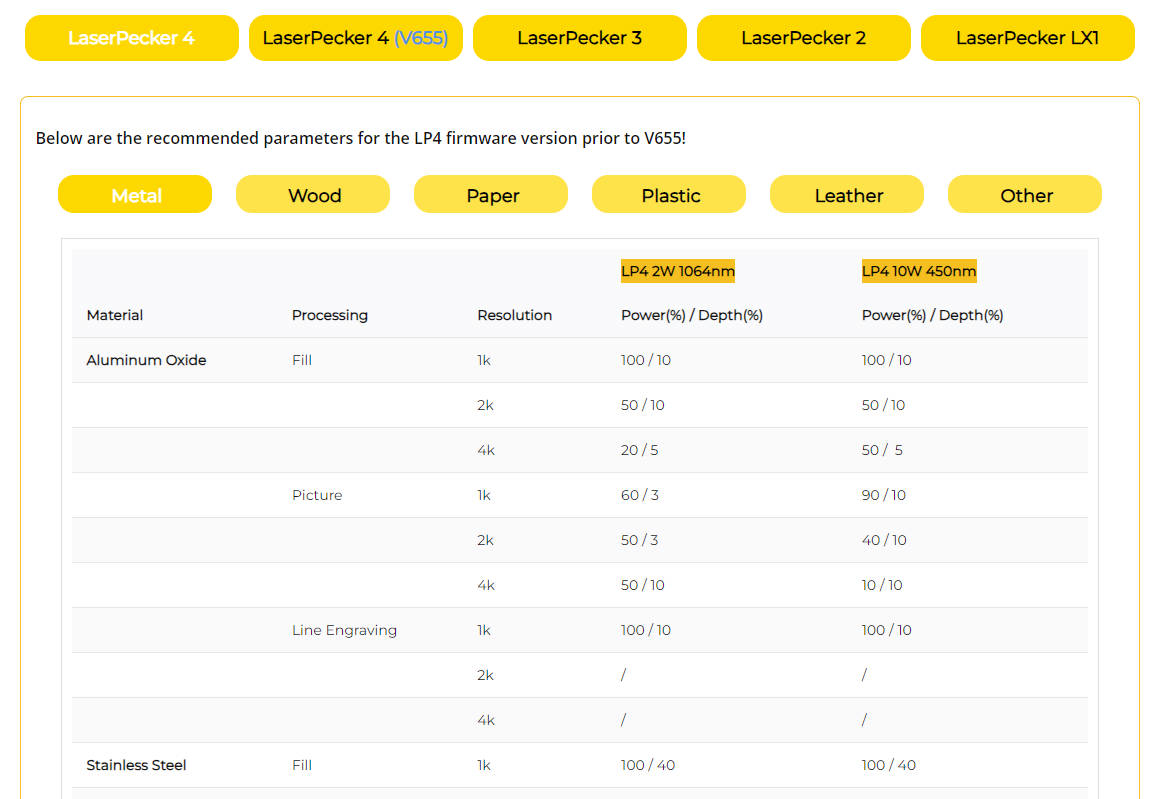
Pour des performances optimales, les paramètres recommandés de gravure et de découpe LaserPecker pour les cartes de visite sont les suivants :
- Laser : laser infrarouge de 2 W à 1064 nm
- Résolution : 2K
- Puissance : 100 %
- Profondeur : 3 %
- Passe : 1
La sécurité est essentielle pendant l’utilisation :
- Portez des lunettes de protection ou utilisez une enceinte de protection
- Assurez une ventilation adéquate dans les environnements de travail intérieurs de l’UE
- Utilisez un purificateur d’air pour gérer la fumée et les émissions pendant la gravure
Étape 5 : Commencez dès maintenant à graver vos cartes de visite au laser
Vérifiez attentivement tous les paramètres avant de commencer le processus de gravure. Une fois ceux-ci confirmés, lancez la gravure et surveillez l’opération.
Une fois le processus terminé, nettoyez les cartes avec un chiffon en microfibre ou un nettoyant adapté. Vérifiez chaque pièce afin de vous assurer de la qualité constante de la gravure et d’une finition professionnelle.
FAQ : questions fréquentes sur la gravure de cartes de visite
Q1. La gravure laser de cartes de visite convient-elle aux petites entreprises de l’UE ?
Oui, la gravure laser est largement utilisée par les petites entreprises dans toute l’UE. Elle offre un moyen économique de créer des cartes de visite personnalisées et professionnelles, avec des résultats durables.
Q2. Quels matériaux sont couramment utilisés pour les cartes de visite gravées au laser ?
Les choix courants comprennent l’aluminium, l’acier inoxydable, le bois et l’acrylique. Dans toute l’UE, les entreprises choisissent souvent les matériaux en fonction de leurs besoins en matière d’image de marque, de durabilité et de développement durable.
Q3. Combien de temps faut-il pour graver des cartes de visite ?
La gravure prend généralement quelques minutes par carte, selon le matériau et la complexité du motif. Pour les lots plus importants, le temps de production augmente, mais reste efficace avec une configuration appropriée.
Q4. Les cartes de visite gravées au laser sont-elles durables ?
Oui, les motifs gravés sont permanents et résistent à l’usure. Contrairement aux cartes imprimées, ils ne se décolorent pas et ne se détériorent pas facilement, ce qui les rend adaptées à une utilisation prolongée dans divers environnements de l’UE.
Q5. Quelles précautions de sécurité faut-il prendre lors de la gravure laser en intérieur ?
Les utilisateurs doivent assurer une ventilation adéquate, porter des lunettes de protection et utiliser des systèmes de filtration de l’air lorsque cela est nécessaire. Le respect des pratiques générales de sécurité de l’UE contribue à maintenir un environnement de travail sûr.
Q6. Quel type de graveur laser convient le mieux aux débutants dans l’UE ?
Les graveurs laser à diode compacts sont un choix courant pour les débutants en raison de leur polyvalence, de leur facilité d’utilisation et de leur prix abordable. Ils conviennent à un large éventail de matériaux utilisés pour la production de cartes de visite.
Conclusion
Les cartes de visite gravées au laser offrent bien plus qu’un simple partage de coordonnées : elles témoignent de créativité, de précision et d’un haut niveau de professionnalisme. Que vous optiez pour le bois, apprécié pour son aspect naturel, le métal, reconnu pour sa durabilité et son impact visuel, ou l’acrylique, idéal pour un style contemporain, la gravure laser garantit des résultats nets, détaillés et durables.
Dans toute l’UE, où l’image de marque et la qualité sont des facteurs de différenciation essentiels, les cartes de visite personnalisées peuvent aider les entreprises et les professionnels à se démarquer sur des marchés variés.
En suivant les étapes présentées dans ce guide, les débutants peuvent commencer à créer leurs propres cartes de visite gravées professionnellement en toute confiance. Avec le bon équipement, une conception réfléchie et une exécution soignée, vous pouvez produire des cartes de visite qui ne se contentent pas de transmettre des informations, mais laissent également une impression forte et durable.





