


































































Jewellery engraving is a popular way to personalise jewellery and turn it into a meaningful keepsake. Names, dates, initials, or custom messages can all be engraved to create a lasting and distinctive finish. From simple DIY approaches to professional engraving techniques, there are various methods suitable for engraving rings, bracelets, pendants, and other jewellery pieces.
This guide introduces six effective methods for engraving jewellery. Whether you are new to engraving or running a small business, you can choose a method that matches your requirements, equipment, and budget.

In this article:
- Method 1: Engrave Jewellery Using a Fibre Laser Engraver
- Method 2: Engrave Jewellery Using a Rotary Tool
- Method 3: Engrave Jewellery Using Chisel and Hammer
- Method 4: Engrave Jewellery via Stamping
- Method 5: Engrave Jewellery Using a Jewellery CNC Machine
- Method 6: Engrave Jewellery Using a Cricut Maker
Method 1: Engrave Jewellery Using a Fibre Laser Engraver
Fibre laser engraving is a highly precise method that uses a focused laser beam to engrave designs onto jewellery surfaces. It is commonly used for engraving detailed text, patterns, and logos on metal jewellery, as well as other compatible materials. This technique is widely adopted across the EU for professional and small-scale commercial jewellery engraving.
What You'll Need for Jewellery Laser Engraving
- Fibre laser engraving machine
- Jewellery items made from metal, acrylic, wood, or leather
- Design software (e.g., LightBurn, LaserPecker Software & App)
Steps to Engrave Jewellery with a Fibre Laser
Step 1: Prepare the Design
Create or import your design using engraving software. Ensure the design matches the size and shape of the jewellery piece.
Step 2: Prepare the Jewellery
Clean the jewellery surface to remove dust, oils, or residues. Secure the item firmly on the laser bed or rotary attachment if engraving curved pieces.
Step 3: Choose the Right Jewellery Laser Engraver
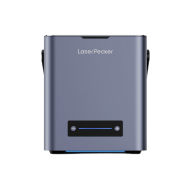
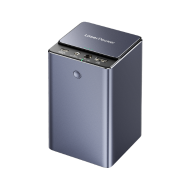
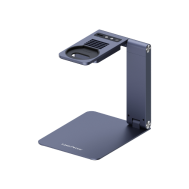
Selecting the right machine is critical for achieving clean, precise results across different jewellery materials. A dual-laser system such as the LaserPecker LP5 is particularly well suited for jewellery engraving.
Why it's ideal for jewellery engraving:
-
Dual laser system:
450 nm diode laser for engraving leather, wood, plastics, and non-metal jewellery components
1064 nm fibre laser for precise engraving on metal jewellery such as gold, silver, stainless steel, and alloys
-
High engraving speed:
Engraving speeds of up to 10,000 mm/s, enabling fast turnaround for both single custom pieces and small-batch production.
-
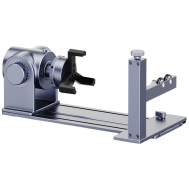
Rotary and slide extensions:
Supports rings, bangles, and cylindrical jewellery, as well as batch engraving with consistent positioning.
-
Compact and workshop-friendly:
Designed for home studios and small workshops without the space or noise demands of industrial systems.
- Engraving tools
- Jewellery blanks (aluminium, silver, copper, wood, acrylic, etc.)
- Clamp, vise, or non-slip mat
- Polishing cloth or fine sandpaper
- Gravers or chisels
- A small jewellery hammer
- An engraving block or vice to hold the jewellery securely
- Pencil or scribe (for sketching the design)
- Metal stamps (alphabet, numbers, symbols)
- A small jewellery hammer
- Jewellery blanks (aluminium, copper, brass, silver, etc.)
- Polishing cloth
- A jewellery CNC engraving machine
- Computer with CAD/CAM software
- Jewellery blanks (gold, silver, stainless steel, titanium, etc.)
- A vice or clamps to secure the jewellery
- Polishing cloth
- Cricut Maker
- StrongGrip mat
- Thin, flat metal blanks (for example, aluminium, anodised aluminium, or stainless steel)
- Painter's tape or masking tape (to secure the blank)
- Computer with Cricut Design Space software
Step 4: Set Up the Laser Machine
Choose the correct material settings, including power, speed, and frequency. For rings or cylindrical jewellery, configure the rotary extension accordingly.
Step 5: Preview the Engraving Area
Use the preview or framing function to confirm alignment, position, and scale before engraving.
Step 6: Start Engraving
Begin the engraving process while monitoring accuracy and safety. Fibre laser engraving is fast and typically takes only a few minutes per piece.
Step 7: Post-Processing
Clean the engraved area to remove debris. Apply polishing or protective coatings if required for a refined finish.
Advantages and Limitations of Fibre Laser Jewellery Engraving
✔️ Advantages:
Exceptional precision and fine detail
Fast engraving speed, suitable for small to medium batch production
Non-contact process, reducing tool wear and surface damage
Compatible with a wide range of materials
❌ Cons:
Requires specialised and relatively expensive equipment
Method 2: Engrave Jewellery Using a Rotary Tool
Rotary tool engraving involves manually engraving jewellery with a handheld engraving tool or electric engraving pen. This method is well suited for beginners and hobby users who want a low-cost and flexible way to engrave soft metals and non-metal materials.
What You'll Need:
Step 1: Mark Your Design
Outline your design directly on the jewellery surface using a pencil, stencil, or masking tape.
Step 2: Secure the Jewellery
Fix the jewellery piece firmly in a clamp or vice, or place it on a non-slip mat to prevent movement during engraving.
Step 3: Choose and Install the Bit
Select a fine engraving bit suitable for the material and level of detail, then install it securely in the tool.
Step 4: Begin Engraving
Switch on the rotary tool and carefully trace the design using light, steady pressure. Take regular breaks to avoid overheating or accidental slipping.
Step 5: Clean and Finish
Brush away debris and polish the engraved surface if needed to improve contrast and smooth the edges.
Advantages and Limitations of Rotary Tool Jewellery Engraving
✔️Advantages:
Affordable and accessible
No computer or software needed
❌ Limitations:
Requires a steady hand and practice
Less precise than laser or CNC engraving
Time-consuming for complex designs
Method 3: Engrave Jewellery Using Chisel and Hammer
Hand engraving is a traditional and highly artistic method where designs are engraved directly onto jewellery using manual tools and gentle hammer taps. This technique has been used by jewellers for centuries and is valued for producing distinctive, handcrafted details that cannot be easily replicated by machines.
What You'll Need:
Step 1: Sketch the Design
Draw the design directly onto the jewellery surface using a fine pencil or scribe. Beginners should start with simple patterns to build control.
Step 2: Secure the Jewellery
Fix the piece firmly in an engraving block or vice to keep it completely stable during engraving.
Step 3: Select the Right Graver
Choose a graver shape that matches your design, such as flat, round, or square tips, and ensure the tool is properly sharpened.
Step 4: Begin Engraving
Hold the graver at a controlled angle and tap it gently with the hammer while guiding it along the design lines. Work slowly to maintain consistent depth and clean cuts.
Step 5: Refine and Finish
Clean the surface with a polishing cloth and remove any burrs. Rework shallow lines if necessary to improve clarity and visibility.
Advantages and Limitations of Hand-Engraved Jewellery
Advantages:
Truly handmade results
Works well on softer metals (silver, gold, copper, brass)
Limitations:
Time-consuming, especially for detailed designs
Not ideal for production-scale work
Method 4: Engrave Jewellery via Stamping
Metal stamping is a jewellery engraving technique that uses force to press letters, numbers, or symbols directly into the metal surface. It is particularly suitable for simple, bold designs and personal messages, making it a popular choice for engraving names, initials, and important dates on jewellery pieces.
What You'll Need:
Step 1: Plan Your Layout
Use tape or a stamping guide to mark your design placement and keep letters straight.
Step 2: Position the Blank
Place the blank on a steel bench block to provide a solid backing for stamping.
Step 3: Align the Stamp
Hold the stamp vertically and position it on the desired spot.
Step 4: Strike with Hammer
Give a solid, single strike with the hammer. Avoid hitting more than once to prevent blurring.
Step 5: Darken & Polish (Optional)
Darken the stamped area with a marker or patina solution, then wipe off the surface to reveal contrast.
Advantages and Limitations of Metal Stamping Jewellery
✔️ Advantages:
Affordable and easy to learn
No electricity or complex tools required
❌ Limitations:
Limited detail
Only works well on flat, soft metal
Mistakes are hard to fix
Method 5: Engrave Jewellery Using a Jewellery CNC Machine
CNC (Computer Numerical Control) engraving uses a precision milling machine guided by digital design files to engrave jewellery with high accuracy. This method is ideal for producing detailed, consistent, and repeatable engravings on metal jewellery, making it a popular choice for professional jewellers and small-scale production workshops in the UK.
What You'll Need:
Step 1: Create or Import the Design
Use CAD software to design your text, logo, or pattern. Convert it into a toolpath using CAM software.
Step 2: Mount the Jewelry Piece
Secure the jewellery blank firmly on the machine bed using a vice or clamps to prevent movement.
Step 3: Set Up the Machine
Load the design file, choose the engraving bit, and set the spindle speed, feed rate, and depth.
Step 4: Run a Test Pass
Do a trial run on a scrap piece or air pass to confirm positioning and accuracy.
Step 5: Start Engraving
Begin the engraving process and monitor the machine during operation for safety and precision.
Step 6: Clean and Polish the Jewellery
Remove any remaining debris and polish the engraved area to achieve a clean, professional finish.
Advantages and Limitations of CNC Jewellery Engraving
✔️ Pros:
Extremely precise and detailed
Repeatable results — ideal for batch production
Fully automated process after setup
❌ Cons:
High upfront cost for machine and software
Setup takes time for each new design
Method 6: Engrave Jewellery Using a Cricut Maker
The Cricut Maker is a versatile cutting and crafting machine that can also engrave using a dedicated engraving tip. It is particularly well suited for customising thin, flat metal jewellery pieces such as tags, charms, and pendants, making it a popular choice among DIY crafters and hobbyists in the UK.
What You'll Need:
Step 1: Design Your Artwork
Open Cricut Design Space and create or import your design. Adjust the size to fit your jewelry piece.
Step 2: Prepare the Blank
Place the metal blank on the StrongGrip mat and tape down all edges to prevent movement.
Step 3: Align and Send to Machine
Position the design precisely over the blank using the software's preview grid, then start the engraving process.
Step 4: Remove and Polish
Carefully remove the blank from the mat and tape. Wipe or polish the surface to highlight the engraved design.
Advantages and Limitations of Cricut Maker Jewellery Engraving
✔️ Pros:
User-friendly
Affordable compared to laser or CNC machines
Works with many DIY-friendly metals
❌ Cons:
Limited to thin, flat metal pieces
Not suitable for deep engraving or curved jewellery
FAQs: Common Questions About Jewellery Engraving
1. Is it possible to engrave jewellery yourself?
Yes, jewellery engraving can be done at home using laser engraving machines, rotary tools, or manual techniques. The suitable method depends on the jewellery type and required level of detail.
2. Which jewellery engraving method offers the most precision?
Laser engraving provides the highest level of precision and consistency, making it ideal for detailed text, logos, and repeatable designs on metal jewellery.
3. Can curved jewellery items such as rings be engraved?
Yes, curved jewellery like rings can be engraved using rotary attachments with laser or CNC engraving machines to ensure even results.
4. What jewellery materials are suitable for engraving?
Engravable materials include gold, silver, stainless steel, aluminium, brass, copper, wood, acrylic, and leather. Each material requires specific engraving settings or tools.
5. Is jewellery laser engraving suitable for small businesses?
Yes, laser engraving is widely used by small businesses across the EU due to its efficiency, repeatability, and professional-quality results.
6. How long does jewellery engraving take?
Laser engraving typically takes only a few minutes per item. Manual and CNC engraving methods may require more time depending on design complexity.
7. Does engraving damage jewellery?
When done correctly, engraving does not damage jewellery. Non-contact methods such as laser engraving minimise surface stress and help preserve the integrity of the piece.
Conclusion
Jewellery engraving is a creative process that can be both fun and highly rewarding, no matter your level of experience. For those seeking consistent, professional-quality results with less manual effort, laser engraving remains one of the most effective solutions. LaserPecker jewellery laser engravers offer high precision, fast processing, and flexible engraving capabilities suitable for detailed designs, personalised text, and small-scale commercial production.
Whether you are producing unique gifts or developing a jewellery business, using a laser engraver can significantly enhance efficiency, quality, and creative potential.





